Their data.

Delivered on schedule.

Your merchants never lose access to their data. You never had to build the infrastructure.

Every transaction, every order, every financial movement your merchants process on your platform is available for export at any time, configured exactly the way their systems expect it. Column names, data formats, filters, delivery schedule, destination server, every parameter is in their hands. You give them an export infrastructure that most payment platforms don't offer.  You didn't build it. It's already there.

Book a demo
Hero image

The view is the export.

You hand your merchants their data, not a fixed report. Most payment platforms offer preset exports: predefined columns, fixed formats, generic naming. Your merchants receive a file and spend time transforming it before it's usable. On NORBr, the export is always the exact snapshot of the view the merchant built. What they see on screen is what they receive in the file. No transformation step. No reconciliation between the export and what the interface shows.
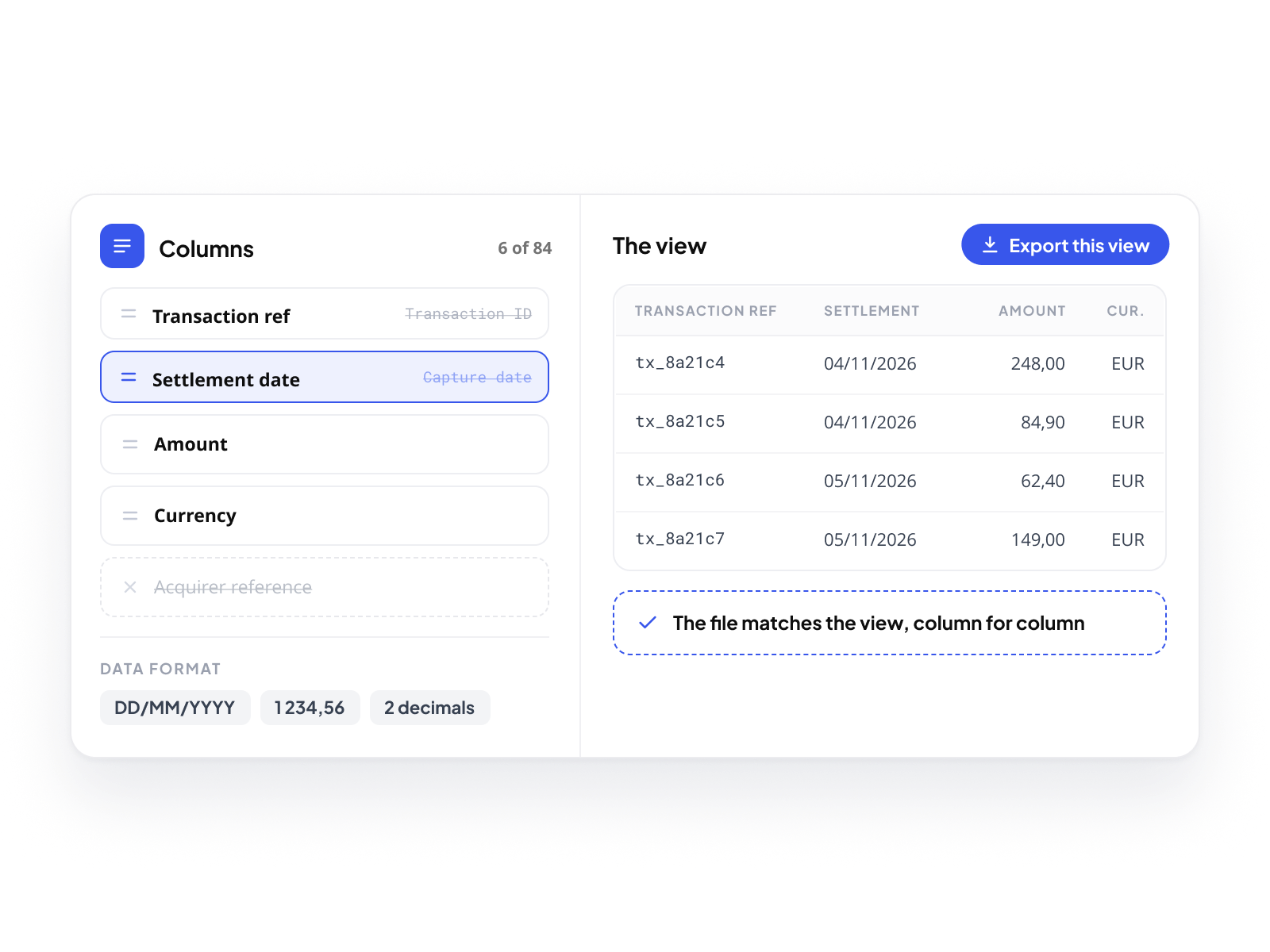
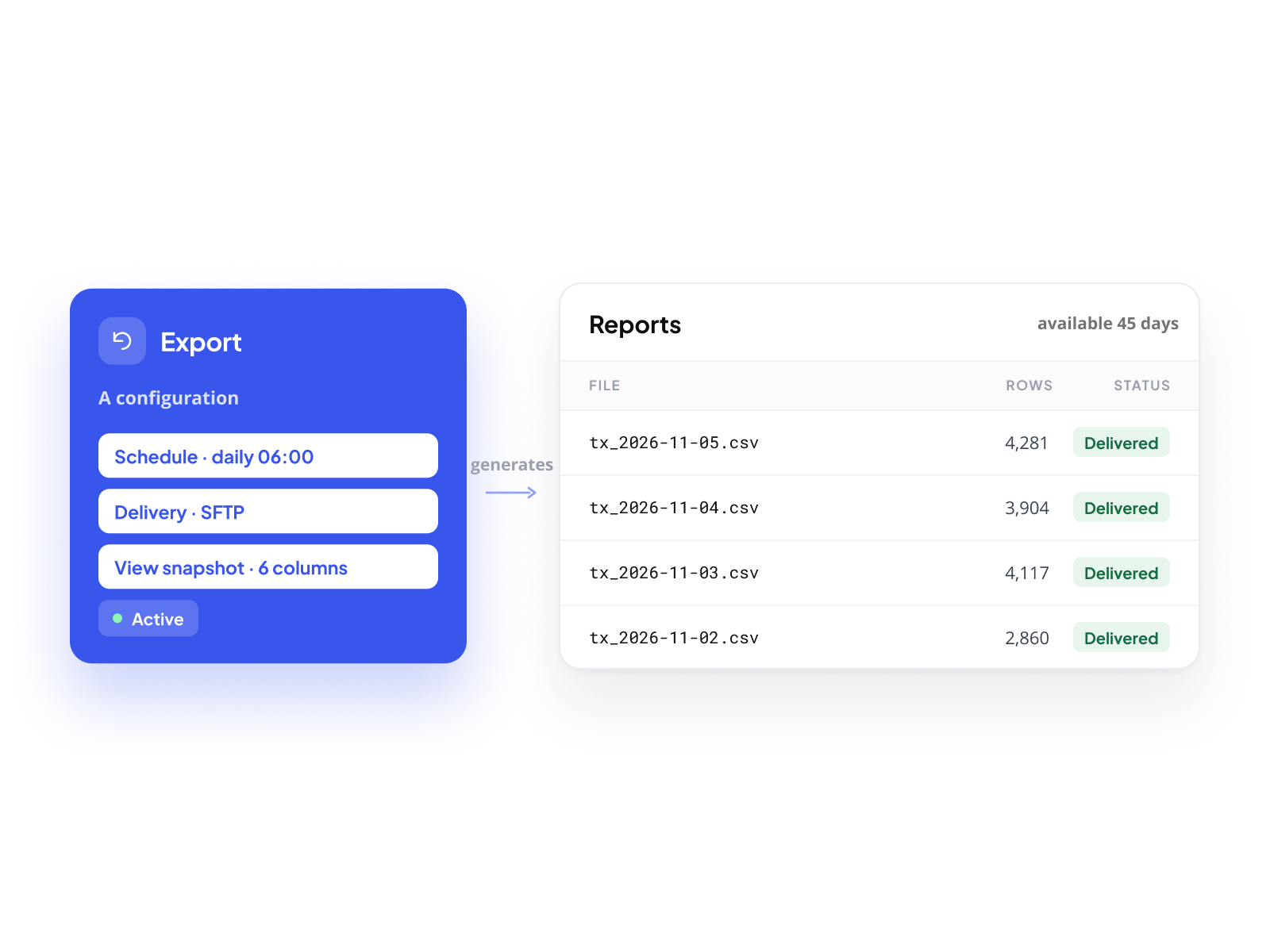
Configure the view. Then export it.
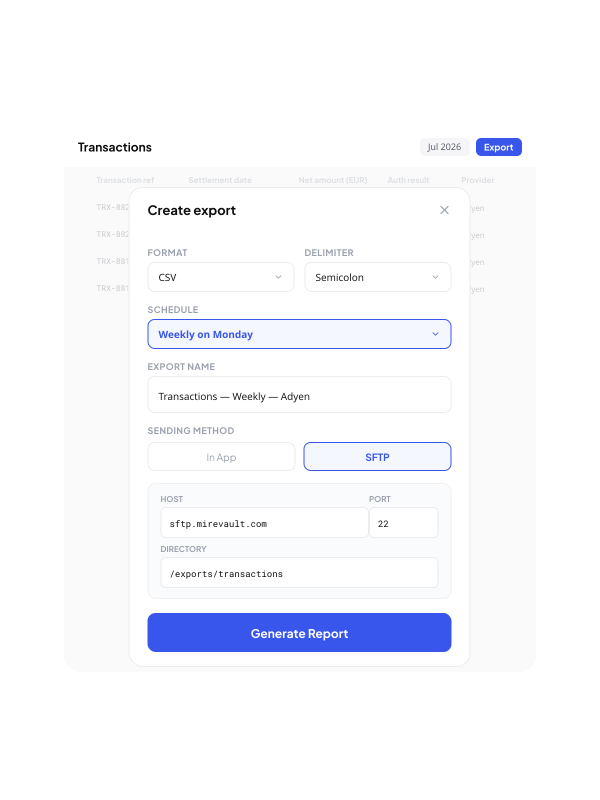
Before triggering an export, every merchant configures their view exactly as they need it. Add only the columns that matter. Remove the ones that don't. Rename columns to match internal nomenclature: "Transaction ref" instead of "Transaction ID", "Settlement date" instead of "Capture date". Apply the data format their ERP or accounting system expects: date formats, number separators, decimal conventions. Reorder columns so the file maps directly to their import template. Filter the dataset to exactly the scope of the export. Once the view is ready, the export reflects it exactly.
Export and Report. Two distinct objects.
An Export is a configuration: the schedule, the delivery method, the snapshot of the view at the moment of creation. A Report is a file generated by that Export at a given point in time. One Export produces multiple Reports over its lifetime. Each Report is traceable, downloadable for 45 days, auditable. Merchants manage their Exports in one place, active, paused, scheduled, historical, and drill into each Report's detail independently.
One-time or recurring. In-app or SFTP.
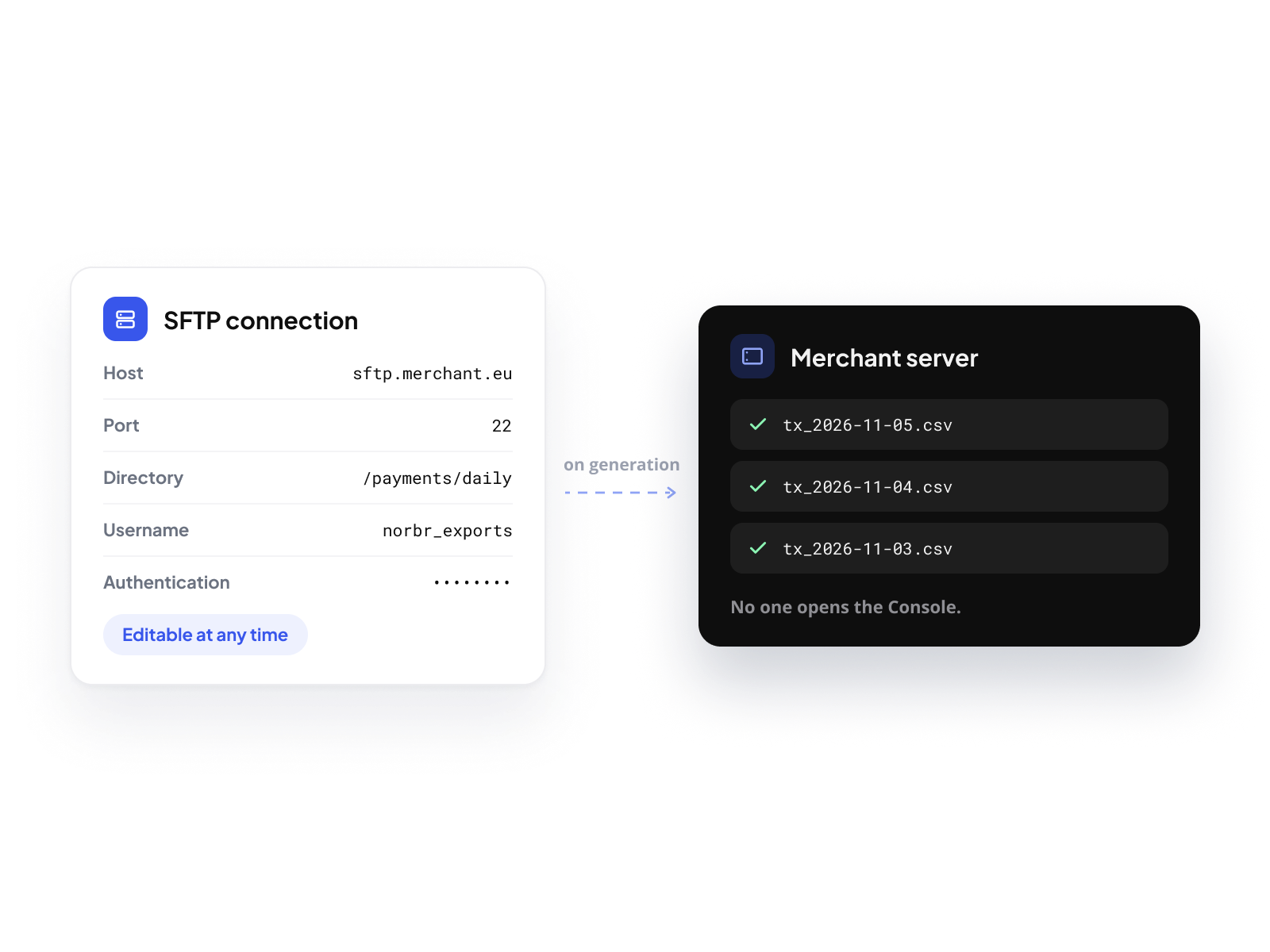
A one-time export retrieves a specific dataset immediately. A recurring export runs automatically on the schedule the merchant defines, always based on the same view configuration, always delivering fresh data when relative date filters are applied. The file arrives in-app for manual download, or directly on a remote server via SFTP. For merchants who feed payment data into an ERP, an accounting system, or a reconciliation pipeline, the transfer happens automatically, without anyone opening the console.
Schedule once. Run forever.
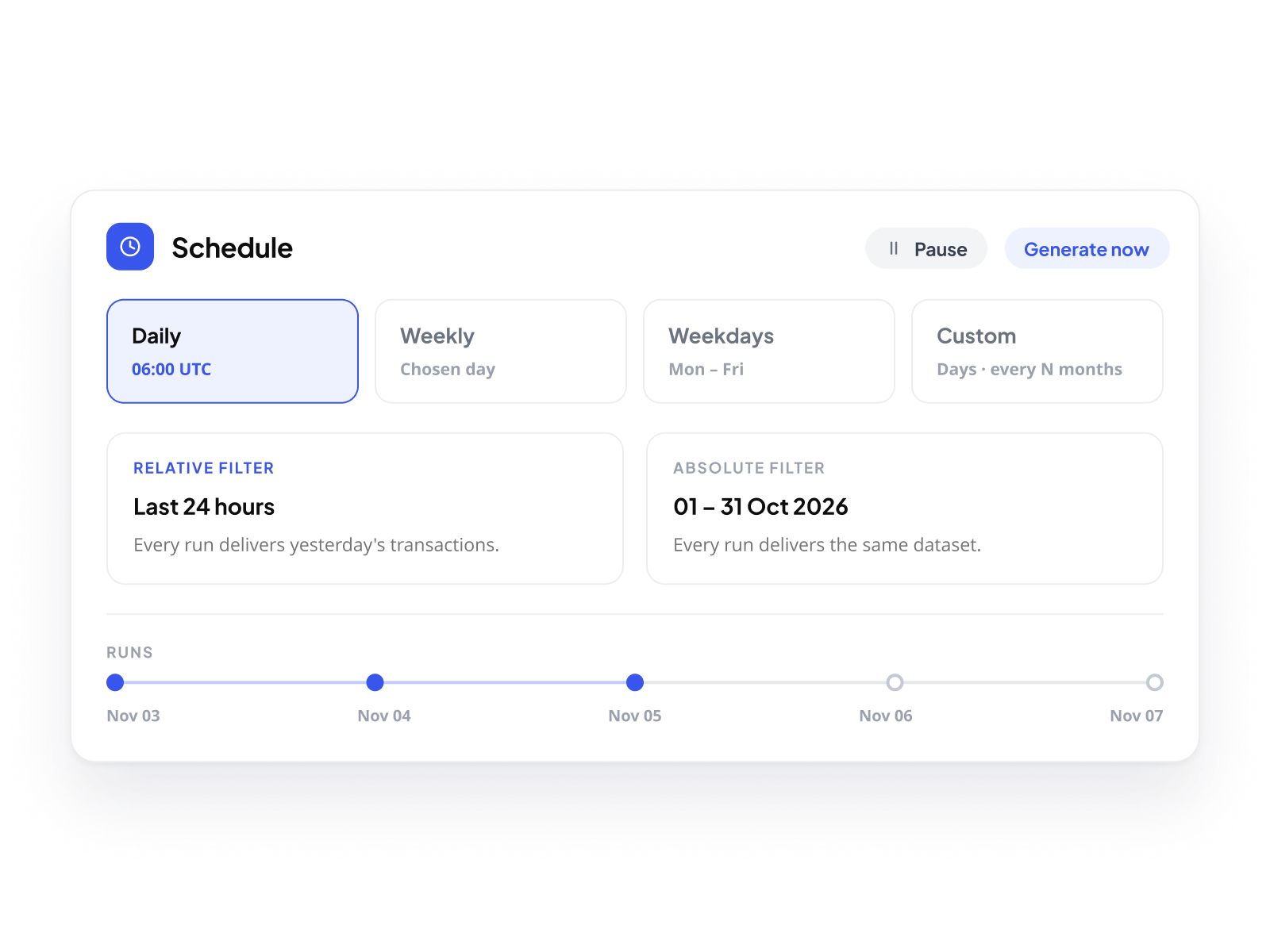
Recurring exports run daily, weekly, every weekday, or on a custom schedule: specific days of the week, specific days of the month, every N months. Each run captures the data as defined by the view at creation time. Relative date filters keep the export fresh: a daily export configured on "last 24 hours" always delivers yesterday's transactions. Absolute filters export the same dataset every time, useful for fixed reporting periods. Schedules can be paused and resumed without losing the configuration. On-demand generation is always available alongside the recurring cadence.
Delivered to the server. Automatically. 
SFTP delivery sends each generated Report directly to a remote server without any manual action. Merchants configure the connection once: host, port, target directory, username, and authentication method, password etc.. Connection details are fully editable at any time from the Export configuration, without deleting and recreating the export. The transfer happens as soon as the file is generated.
 Complete visibility. On every Report.
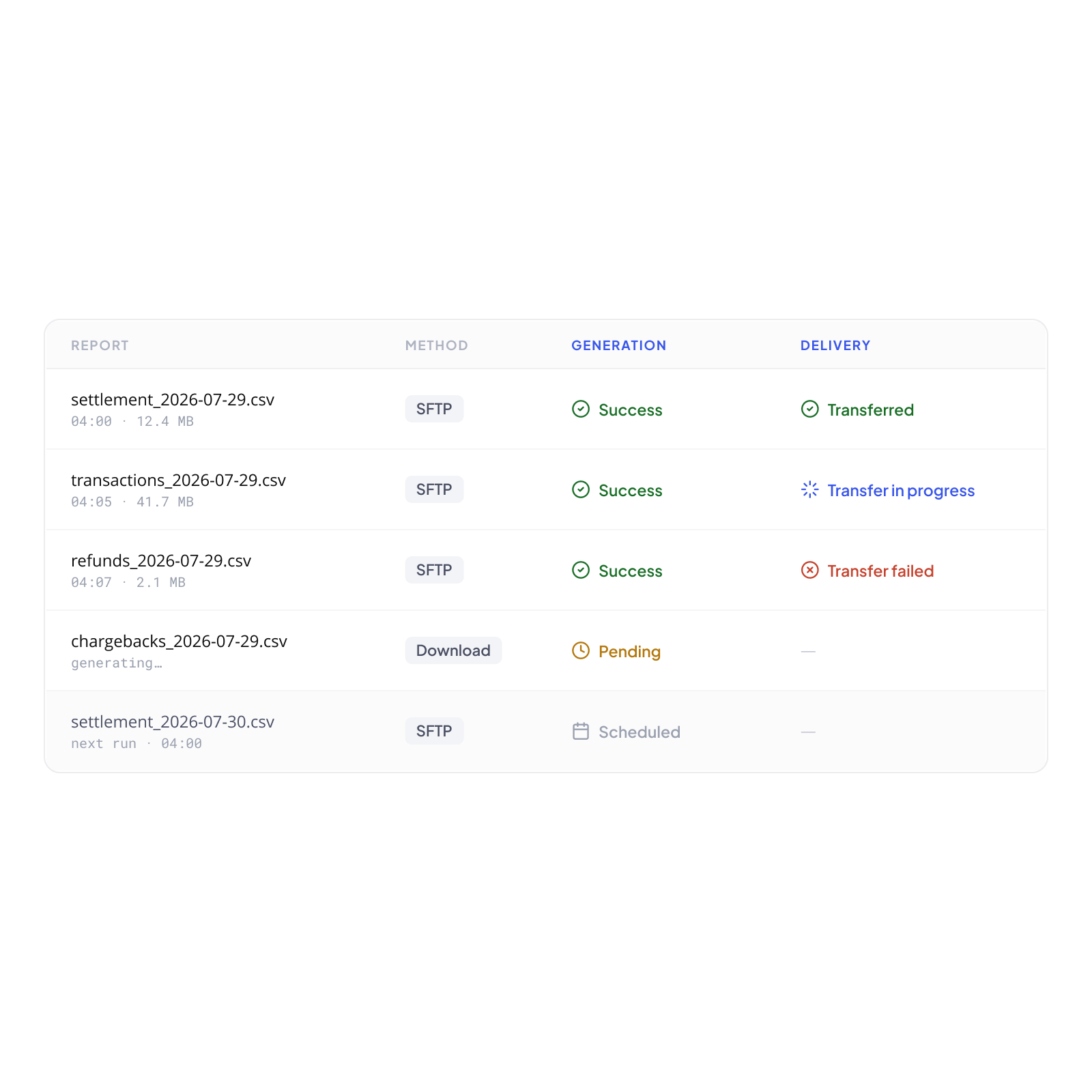
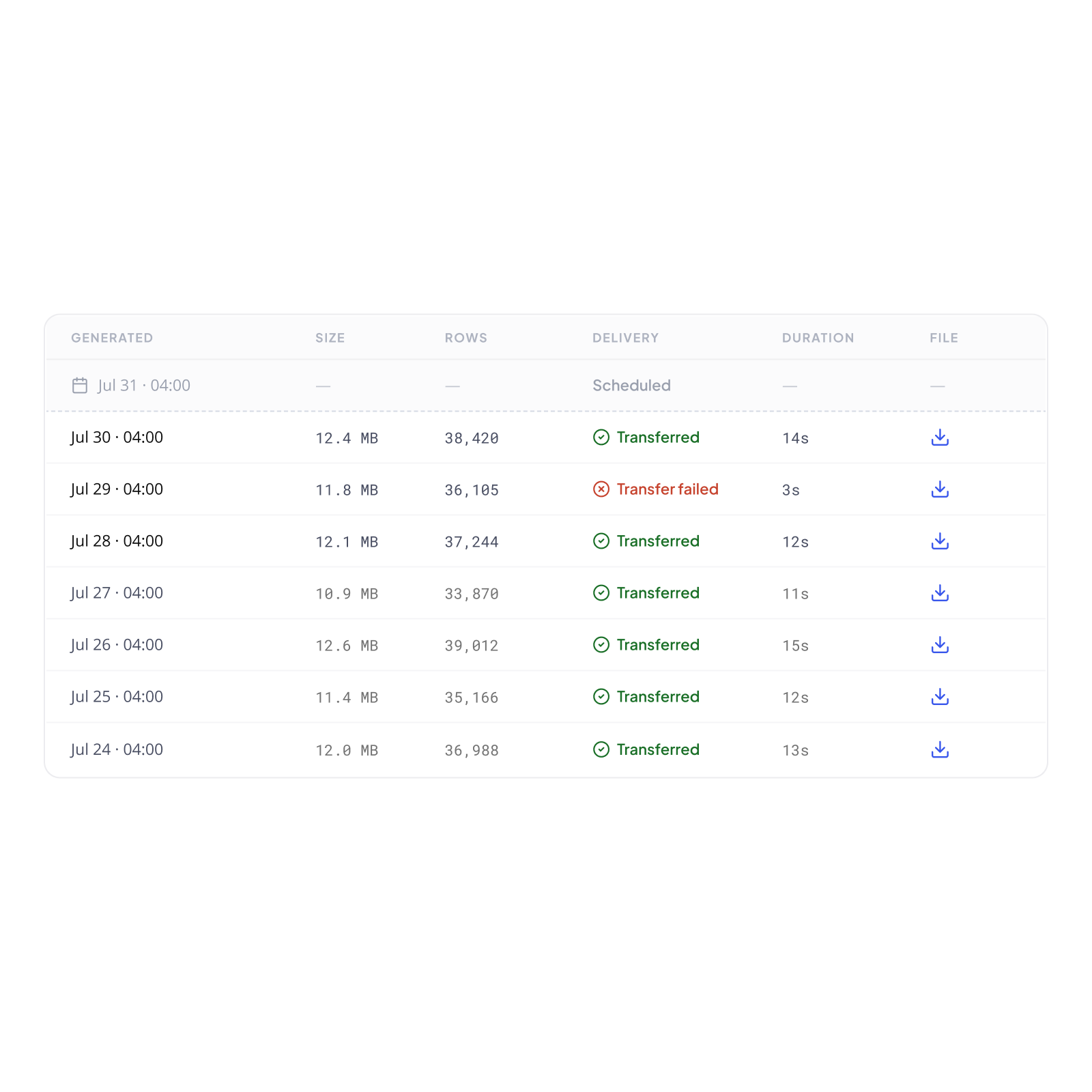
Every Report exposes its full state: file generation and SFTP delivery, independently tracked, always explicit. Your merchants see what was produced, when, at what size, and whether it reached its destination. Every step of the export lifecycle is visible, in one place, without any manual verification.
Generation and delivery. Each tracked independently.
Every Report shows its generation status (Success, Pending, Scheduled, or Failed) and, when the delivery method is SFTP, a distinct delivery status for the transfer itself. File generated and transfer successful. File generated and transfer in progress. File generated and transfer failed. Each state is precise. Each is immediately visible in the Reports table, without drilling further.
When a transfer fails. The detail is there.
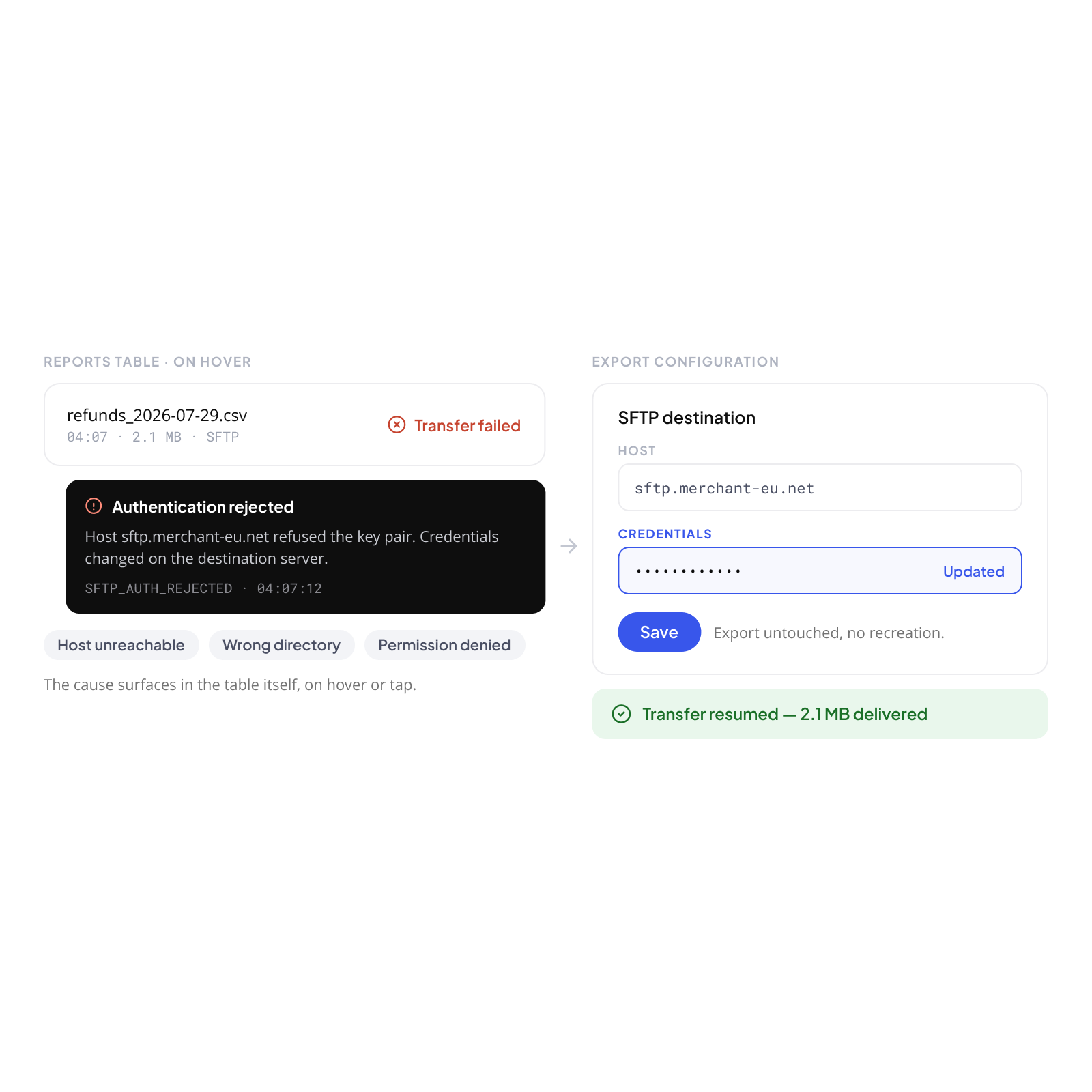
When an SFTP transfer fails, the error is specific and human-readable: authentication rejected, host unreachable, wrong directory, permission denied. The detail surfaces directly in the Reports table, on hover or tap. Your merchants identify the cause, a credential change, a server reconfiguration, and fix it from the Export configuration page without recreating the export. One save. Transfer resumes.
The full history. Always accessible.
Every Report generated by an Export is listed in its detail page, in reverse chronological order, with a placeholder row for the next scheduled execution. Generation timestamp, file size, row count, delivery status, SFTP transfer duration, all visible. Reports are downloadable for 45 days. The complete audit trail of every data extraction is available at any time, to the merchant and, in read-only mode, to every scope above them.
Every data flow. Visible at every level.
The same principle that applies to dashboards applies to exports: every level sees what falls within its scope. A Merchant Account user manages their own exports. A Program Manager sees every export configured across their portfolio, active, paused, scheduled, failed. A Meta Program Manager sees the full network. No data leaves the structure without being traceable at the level above.
Your merchants' exports. Your visibility.
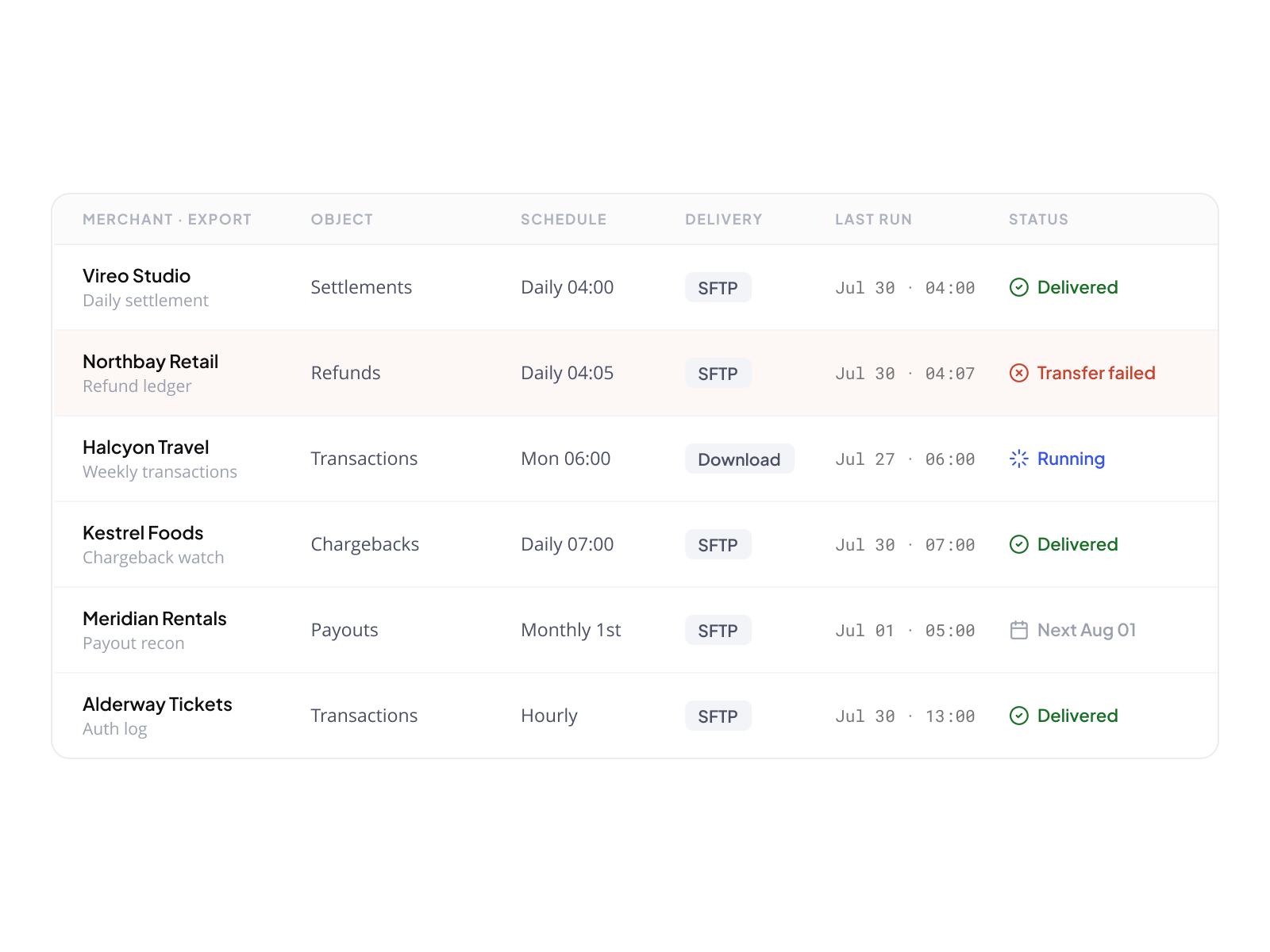
From your operator view, every Export configured by every merchant in your network is visible in a single table. Name, object, schedule, delivery method, last execution, current status. You see what is running, what has failed, and what is scheduled next, without accessing the merchants' data itself. When a merchant reports a missing file, the answer is one row away.
Data sensitivity. Always visible.
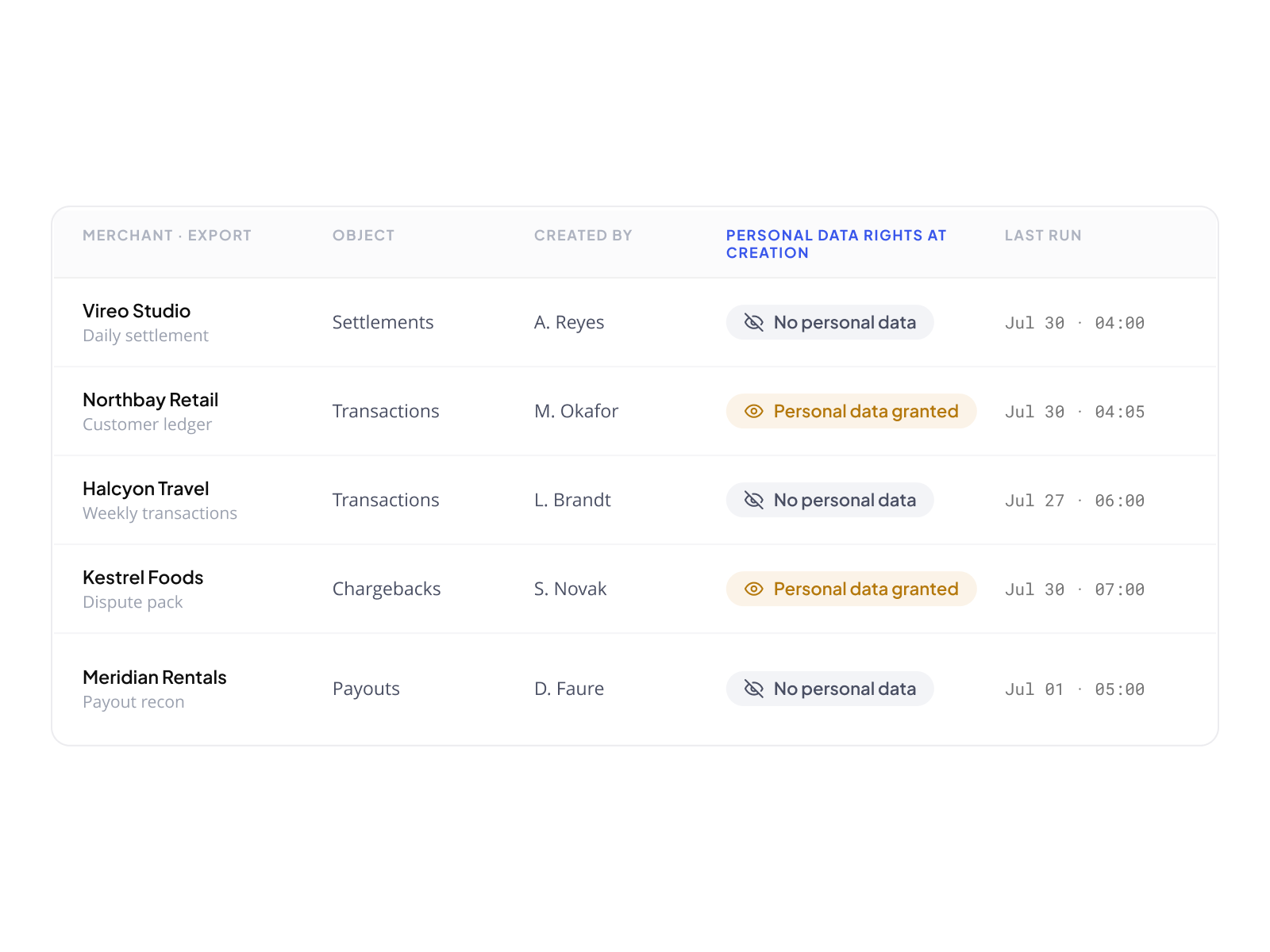
When a user above Merchant Account level views the Exports table, each export row shows whether the merchant who created it had personal data access rights at the time of creation. Not the data itself, only whether sensitive data may be present in the file. Compliance teams and operators know what left the network and under what access conditions, without any additional tooling.

Your merchants keep full access to their data.
You keep full visibility on every flow.

Configured once. Delivered automatically. Traceable at every level.

Book a demo